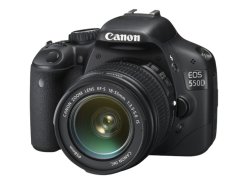
The cheapest way to get rid of stuck pixels on Canon DSLR cameras

After I bought my new Canon EOS 40D and took some blue hour and night photos I found out that i have a bright white pixel near the center of the image. I found out that the
RAW converter fixes this problem but JPG files are still an issue.
This pixel is a stuck pixel, or sometimes it called dead pixel. Usually stuck pixel is bright, while dead pixel is black.

Of course I was not happy because i thought this means I have to send my brand new camera back for a replacement or repair. So I started to google this problem and deep in a forum I found something, something interesting: It seems Canon cameras has a self repair function that can be activated through the menu. All we have to do is to charge up the batteries and go to the menu and initiate a “Manual Sensor Cleaning” then wait about a half minute then turn off the camera.
I made several tests and was not able to see the stuck pixel again on JPG images after this process so IT WORKS!

After I posted this solution to my blog I get several responses so this method works on Canon EOS 400D / Digital Rebel XTi, Canon EOS 500D, Canon EOS 50D and Canon EOS 5D Mark II too.

If you have luck with this on other camera models leave a comment and I'll update this post.

canon powershot sd1400

Mon, 01/30/2012 - 18:48

Nice post.

Just my two cents however, would you not consider getting a small digital camera?

Especially nowadays, that they are as advanced aa your big cameras only easier to carry around

Anonymous

Tue, 12/27/2011 - 01:04

Worked for me! I only had this problem on videos.. but it fixed that! canon 550d

Anonymous

Tue, 12/27/2011 - 00:42

Worked for me! I only had this problem on videos.. but it fixed that! canon 550d

Mark

Tue, 12/13/2011 - 02:24

Worked on my 550D; it had a blue pixel right in the centre of the screen.
Instructions for 550D:
- Turn the mode dial to M, Av, Tv or P.
- Select the 'middle spanner menu'
- Select 'sensor cleaning'.
- Select 'clean manually' (if this function is not available check the mode dial is set to M, Av, Tv or P).
-Select 'ok'.
-You will hear a click as the mirror goes up to expose the sensor (of course you'd normally have the lens up). Wait for a minute or two then turn the camera off.

<a href="http://www.yachtofworld.com">andrew</a>

Sun, 11/06/2011 - 05:25

thanks nice article.

Loganix

Thu, 09/01/2011 - 01:35

I've tried this with my Canon 450D, sadly with no luck. I have something between 30-40 dead/stuck/hot pixels. Check my flickr. If you have just a couple of ones, be happy, be even more happy if this works for you. I'm happy since taking shots in raw and importing them to Photoshop with camera raw automatically fixes the pixels for me. Still, I've only owned the camera for about three years now, i would have hoped that these things wouldn't occur this early on. This is something i noticed this past week, and ironically the warranty expired not that long ago either ...

Loganix

Fri, 09/02/2011 - 00:21

UPDATE: After some more testing, it has come to my understanding that these pixels i get are "Hot Pixels" due to longer exposures. All from 1s to 30s renders a different amount of pixels, 30s given the most, about 30-40 static pixels, as low as only 1 or 2 at maybe 1s. From the test shots in speeds faster than 1s I've yet to see any bad pixels and hopefully i will not do for a good while.

Peter

Sun, 06/12/2011 - 19:02

It worked with my 450d! I had a red pixel for over a year. Didn't believe it would work but it did. Thanks for the advice.

Anonymous

Thu, 03/24/2011 - 09:10

I don't think stuck/dead/bad pixels have anything to do with sensor dirtiness/cleaning. They are electrons stuck in one pixel of the sensor. I believe those pixels will be gone if you switch the camera off and on again.

Anonymous

Sat, 11/26/2011 - 17:35

Didn't work for me and Iam now on the second Canon 550D which also has this problem after only 8 months use.Fix this Canon.

mice007

Fri, 07/15/2011 - 00:50

This is true, but it seems Canon has a software feature in the firmware that cleans up the bad pixels during this process.

Emma

Sat, 10/08/2011 - 03:06

Someone solved the problem of Canon EOS 40D?

Post new comment

The content of this field is kept private and will not be shown publicly.
  • Web page addresses and e-mail addresses turn into links automatically.
  • Allowed HTML tags: <a> <strong>
  • Lines and paragraphs break automatically.

More information about formatting options

By submitting this form, you accept the Mollom privacy policy.

Flickr Group photos

Singapore Flyer: Spinning WheelBluesee the brave day sunk in hideous nightIn StillnessChristmas at the LedgeBoulevard Haussmann, Paris

Join to the Blue Hour Flickr Group and add your best images to share it with other fans of the blue hour and night photography on this site.

Contact Me

If you have any ideas, found a bug or just want to say something, contact me using the contact form. Any messages or comments are welcome!